| HPos Property | ||||||||||

|
||||||||||
|
|

Notes
|
This property determines the horizontal offset of blocks of text - used for left alignment, right alignment or centering. The offset is measured as a proportion of the distance from the left. A value of zero indicates left alignment, a value of one half indicates centered text and a value of one indicates right alignment. Intermediate values can be used for intermediate offsets. To vertically align text use the VPos property. To justify text use the Justification property.
|
Example
|
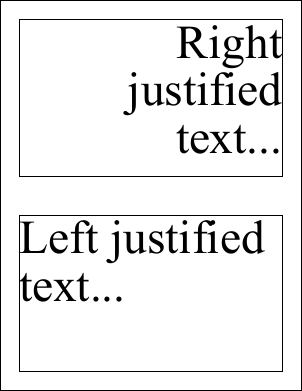
The following code adds two blocks of text to a document. The first block is left aligned and the second is right aligned. Before adding the text we change the current rectangle and frame it so that you can see how the text is aligned.
using var doc = new Doc();
doc.FontSize = 96;
doc.Rect.Magnify(1.0, 0.5);
doc.Rect.Inset(40, 40);
doc.FrameRect();
doc.AddText("Left justified text...");
doc.Rect.Move(0, doc.Rect.Height + 80);
doc.FrameRect();
doc.TextStyle.HPos = 1.0;
doc.AddText("Right justified text...");
doc.Save("dochpos.pdf");
Also see example code in: ABCpdf Deletion Example, ABCpdf Headers and Footers Example, Doc AddPage Function, Doc Append Function, Doc Read Function, Doc RemapPages Method, XRendering SaveAlpha Property, XTagging Close Function, XTransform AngleUnit Property, XpsImportOperation Import Function, SwfImportOperation Import Function. |