| Multistyle Example | ||

|
||
|
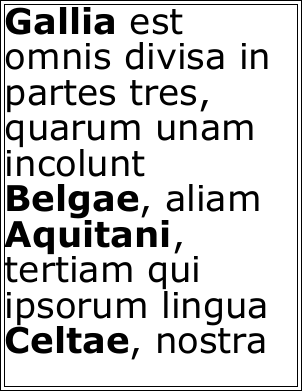
This example shows how to create multistyled text.
|

Setup
|
We want to display all our proper names in bold so we enclose them in bold tags.
string text = "<b>Gallia</b> est omnis divisa in partes tres, quarum unam incolunt <b>Belgae</b>, aliam <b>Aquitani</b>, tertiam qui ipsorum lingua <b>Celtae</b>, nostra <b>Galli</b> appellantur.";
|
Doc Obj
|
Next we create an ABCpdf Doc object and give it some basic settings. Although we could pass our styled text directly to the AddTextStyled function, we can take more control over the way that fonts are added to the PDF if we specify font IDs.
using var doc = new Doc();
doc.FontSize = 72;
doc.Rect.Inset(10, 10);
doc.FrameRect();
int font1 = doc.EmbedFont("Verdana", LanguageType.Latin, false, true);
int font2 = doc.EmbedFont("Verdana Bold", LanguageType.Latin, false, true);
|
Adding
|
We replace the bold tags with font tags that directly reference our chosen fonts and then add the styled text to the current rectangle.
text = "<font pid=" + font1.ToString() + ">" + text + "</font>";
text = text.Replace("<b>", "<font pid=" + font2.ToString() + ">");
text = text.Replace("</b>", "</font>");
doc.AddTextStyled(text);
|
Save
|
Finally we save and clear the document.
doc.Save("styles.pdf");
|
Results
|
|